React Native Deep Linking Integration
This guide will help you integrate ChottuLink Dynamic Links into your React Native app using the official react-native-chottulink-sdk package.
Prerequisites
Before integrating ChottuLink into your React Native app, ensure you have the following:
Development Environment
- React Native SDK (Recommended)
- Nitro Modules SDK
- React Native 0.67.3 or later
- Node.js 16.0 or later
- A working React Native project targeting iOS 14.0+ and Android 6.0+ (API 21+)
- Xcode 16.2 or later installed (for iOS)
- Android Studio or other IDE with Android SDK installed
- Physical devices or simulators/emulators to run your app
This SDK requires custom native modules and is not compatible with Expo Go.
To view Expo Integration docs -> Click here
Supported:
- Expo Dev Build - Full functionality available
- Bare React Native - Full functionality available
- Expo Go - Not supported
For Expo users: Use Expo Dev Build instead of Expo Go.
- React Native 0.76.9 or later
- Node.js 22.0 or later
- A working React Native project targeting iOS 14.0+ and Android 6.0+ (API 21+)
- Xcode 16.2 or later installed (for iOS)
- Android Studio or other IDE with Android SDK installed
- Physical devices or simulators/emulators to run your app
The Nitro SDK is not compatible with Expo Go or Expo Dev Build.
Supported:
- Bare React Native - Full functionality available
- Expo Go - Not supported
- Expo Dev Build - Not supported
For Expo users: You must use the React Native SDK instead.
Configure ChottuLink Dashboard
1. For iOS Click here
2. For Android Click here
Installation
1. Install the required packages:
- React Native SDK (Recommended)
- Nitro Modules SDK
npm install react-native-chottulink-sdk --save
npm install chottulink-rn-sdk react-native-nitro-modules
Note:
react-native-nitro-modulesis required as this library relies on Nitro Modules for maximum performance.
2. For iOS, install pods:
cd ios && pod install && cd ..
Platform Specific Configurations
1. iOS Configuration
Configure Associated Domains
Associated Domains are configured to securely link your app with your website. Without this setup, features like Universal Links won't function properly.
- Open your project in Xcode
- Select your project in the navigator
- Select your target under TARGETS
- Click on the "Signing & Capabilities" tab
- Click the "+" button in the top-left corner of the capabilities section
- Search for and select "Associated Domains"
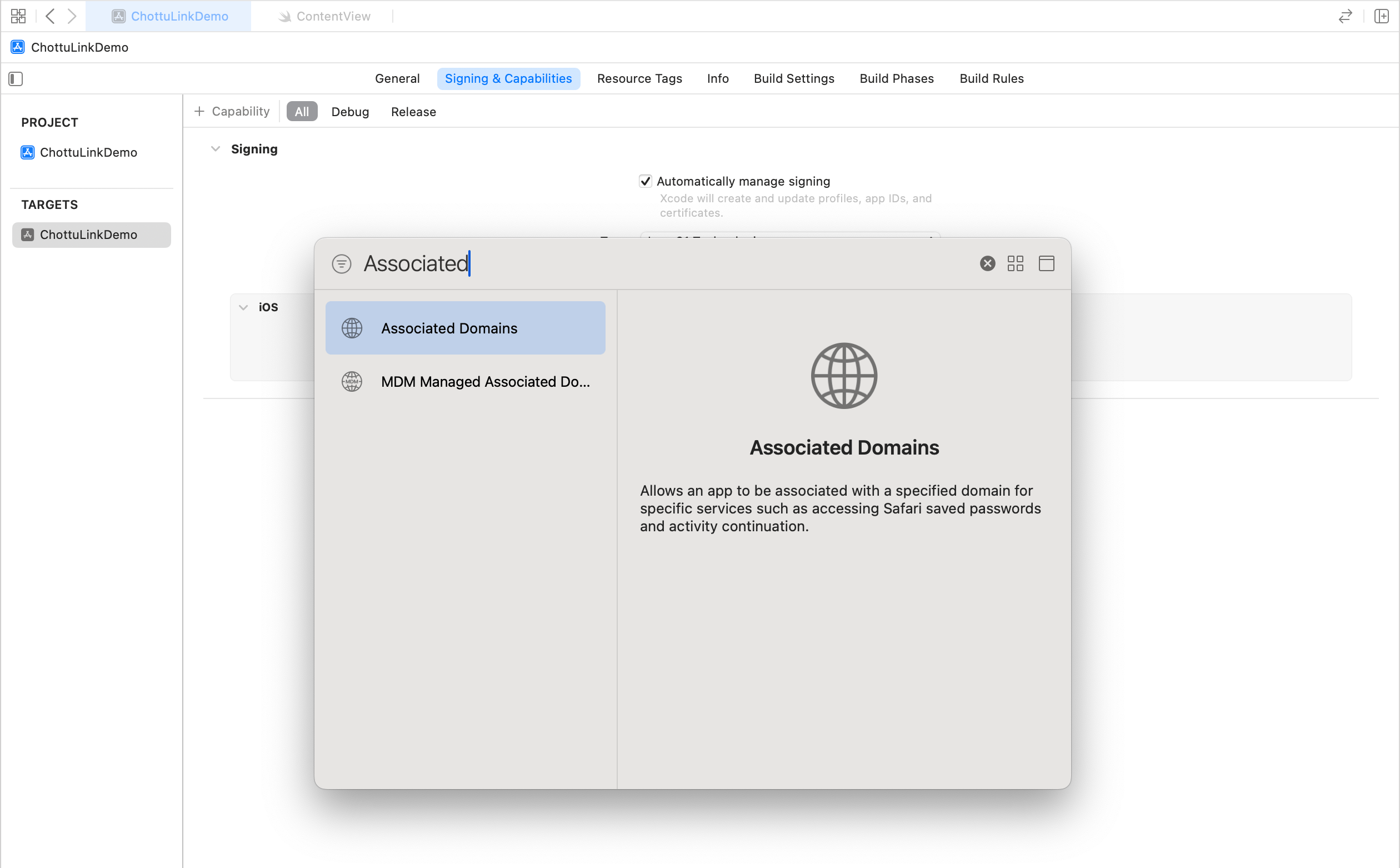
- Add Your Domain
-
In the Associated Domains section that appears, click the "+" button under "Domains"
-
Add your domain using the following format:
applinks:your_dynamic_links_domainFor example, if your domain is
yourapp.chottu.link, you would add:applinks:yourapp.chottu.link
-
To enable deep link handling on iOS, you need to add the following methods to your AppDelegate
- Using Objective-C
- Using Swift
Add the following methods to your AppDelegate.m for deep link handling:
// ... existing imports ...
#import "React/RCTLinkingManager.h"

@implementation AppDelegate
  // ... existing code ...

  // Add these methods for deep link handling
- (BOOL)application:(UIApplication *)app openURL:(NSURL *)url options:(NSDictionary<UIApplicationOpenURLOptionsKey,id> *)options
{
  return [RCTLinkingManager application:app openURL:url options:options];
}

- (BOOL)application:(UIApplication *)application continueUserActivity:(NSUserActivity *)userActivity restorationHandler:(void (^)(NSArray<id<UIUserActivityRestoring>> * _Nullable))restorationHandler
{
  return [RCTLinkingManager application:application continueUserActivity:userActivity restorationHandler:restorationHandler];
}
@end
Add the following methods to your AppDelegate.swift for deep link handling:
import UIKit
import React

@UIApplicationMain
class AppDelegate: UIResponder, UIApplicationDelegate {
  // ... existing code ...

  // Add these methods for deep link handling
  func application(_ app: UIApplication, open url: URL, options: [UIApplication.OpenURLOptionsKey : Any] = [:]) -> Bool {
    return RCTLinkingManager.application(app, open: url, options: options)
  }

  func application(_ application: UIApplication, continue userActivity: NSUserActivity, restorationHandler: @escaping ([any UIUserActivityRestoring]?) -> Void) -> Bool {
    return RCTLinkingManager.application(application, continue: userActivity, restorationHandler: restorationHandler)
  }
}
2. Android Configuration
Update Your App's Manifest File
Your app's android/app/src/main/AndroidManifest.xml file needs the internet permission and intent filters for deep linking:
<manifest xmlns:android="http://schemas.android.com/apk/res/android">
    <!-- Add internet permission -->
    <uses-permission android:name="android.permission.INTERNET" />

    <application>
        <activity
            android:name=".MainActivity"
            android:exported="true"
            android:launchMode="singleTop"
            android:theme="@style/LaunchTheme"
            android:configChanges="orientation|keyboardHidden|keyboard|screenSize|smallestScreenSize|locale|layoutDirection|fontScale|screenLayout|density|uiMode"
            android:hardwareAccelerated="true"
            android:windowSoftInputMode="adjustResize">

            <!-- Add intent filter for deep links -->
            <intent-filter android:autoVerify="true">
                <action android:name="android.intent.action.VIEW" />
                <category android:name="android.intent.category.DEFAULT" />
                <category android:name="android.intent.category.BROWSABLE" />
                <data android:scheme="https"
                      android:host="yourapp.chottu.link" />
            </intent-filter>

            <!-- ... existing intent filters ... -->
        </activity>
    </application>
</manifest>
Important: Replace
yourapp.chottu.linkwith your actual ChottuLink domain.
Initialize the SDK
Basic Initialization
- React Native SDK (Recommended)
- Nitro Modules SDK
import { initializeChottuLink } from 'react-native-chottulink-sdk';

// Initialize with your API key
initializeChottuLink('your-api-key-here');
import { initializeChottuLink } from 'chottulink-rn-sdk';

// Initialize with your API key
initializeChottuLink('your-api-key-here');
Complete App Setup
import React, { useEffect } from 'react';

// When using React Native SDK (Recommended)
import { initializeChottuLink } from 'react-native-chottulink-sdk';

// When using Nitro SDK
import { initializeChottuLink } from 'chottulink-rn-sdk';

const App = () => {
  useEffect(() => {
    // Initialize ChottuLink SDK
    initializeChottuLink('your-api-key-here');
  }, []);

  return (
    // Your app components
  );
};

export default App;
Once the SDK is initialized, see Creating Dynamic Links in React Native and Receiving Dynamic Links in React Native for next steps.